
Time Calculator
⏳ Time Calculator – Calculate Time Accurately and Easily
Managing time accurately is essential in almost every field — from project planning to personal productivity, academic schedules, and even workout sessions. Whether you need to add hours and minutes, calculate the duration between two times, or divide a period evenly, a reliable tool becomes a necessity.
This is where the Time Calculator comes into play — a comprehensive online utility that enables you to perform time-based operations like addition, subtraction, multiplication, division, and interval calculation effortlessly. With a clean interface and intuitive controls, this tool is designed for accuracy, ease, and flexibility. 🕒✨
🛠️ What Is a Time Calculator?
A Time Calculator is a web-based tool that lets you perform various time-related calculations using hours, minutes, and seconds. It’s an ideal companion for professionals, students, or anyone who needs to compute time duration without manual conversions or spreadsheets.
You can:
- Add multiple time periods
- Subtract one time value from another
- Multiply a time duration by a number
- Divide a time into equal parts
- Find the duration between two specific times
Unlike traditional calculators, this tool understands time formats and conversions. For instance, it automatically converts 75 seconds into 1 minute and 15 seconds, or handles negative values gracefully by showing helpful error messages.
✨ Key Features of the Time Calculator
The Time Calculator isn’t just functional — it’s also smart and user-friendly. Here are its most notable features:
🎯 Multiple Operations in One Tool
Unlike basic tools that do only addition or subtraction, this calculator supports five core time operations:
- Add multiple entries to get total time
- Subtract subsequent values from an initial time
- Multiply a time by any whole number
- Divide a time evenly by a given number
- Duration Between two time points for elapsed time
This all-in-one design makes it perfect for varied use cases.
📱 Responsive, Clean User Interface
Built with Tailwind CSS, the calculator has a modern, responsive layout. Whether you’re on a phone, tablet, or desktop, the interface adapts for a smooth user experience.
From radio buttons for selecting operation types to neatly laid-out input fields, every element is designed to be intuitive and accessible.
🔄 Add Multiple Time Entries
Need to add 10 different time entries? No problem. Just click the “Add Time Entry” button to dynamically insert more input fields. The calculator then automatically sums or subtracts them based on your operation choice.
⚠️ Smart Validation and Feedback
Errors are caught and shown gracefully:
- If you try subtracting more time than you started with, it alerts: “Result cannot be negative for subtraction.”
- Multiplication or division by 0 is prevented with proper messages.
- Negative values in inputs are flagged.
This ensures your results are always clean and meaningful.
🔍 Why Use a Time Calculator?
Here’s why this calculator stands out in the sea of online tools:
- Saves time and reduces errors: You no longer need to manually convert seconds to minutes or calculate long durations across multiple entries.
- Perfect for professionals and students: Whether it’s timesheet calculation, class scheduling, or task planning — it’s incredibly useful.
- Works on all devices: The responsive interface ensures smooth usability whether you’re on mobile or desktop.
- No downloads or logins required: It’s fully browser-based and works instantly.
- Handles all scenarios in one place: Whether you want to add, divide, or subtract, it’s all included — no need for multiple tools.
🧭 How to Use the Time Calculator — Step-by-Step Instructions
Let’s explore how to use each feature in detail, along with real-world examples.
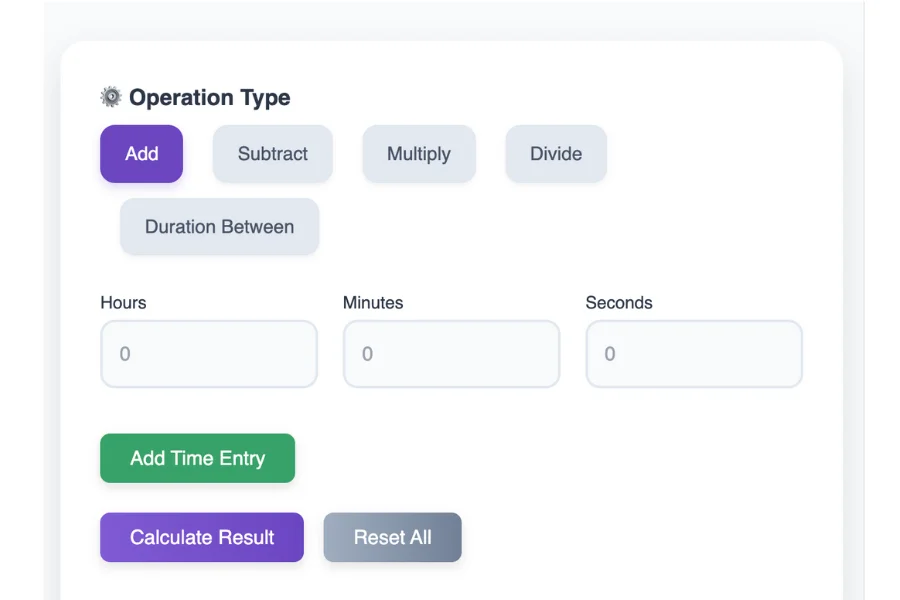
➕ Add Time Entries
Purpose: Add multiple durations together to find total time.
How to use:
- Select the “Add” radio option.
- Input values in Hours, Minutes, and Seconds.
- Click “Add Time Entry” for more time slots.
- Press “Calculate Result”.
Example:
- Time 1: 1 hour, 45 minutes
- Time 2: 2 hours, 30 minutes
- Time 3: 0 hours, 15 minutes
Output:4 hours, 30 minutes, 0 seconds
The calculator normalizes all entries, automatically converting excess seconds and minutes.
➖ Subtract Time Entries
Purpose: Subtract one or more durations from a main time value.
How to use:
- Choose “Subtract”.
- Enter the starting time as the first entry.
- Enter the time(s) you want to subtract.
- Hit “Calculate Result”.
Example:
- Time 1 (Start): 5 hours, 20 minutes
- Time 2 (Subtract): 1 hour, 45 minutes
Output:3 hours, 35 minutes, 0 seconds
⚠️ If the second time is greater than the first, you’ll receive an error saying subtraction can’t result in negative time.
✖️ Multiply Time
Purpose: Scale a single time duration by a factor.
How to use:
- Choose “Multiply”.
- Enter one time entry.
- In the Multiplier field, type a number (e.g., 3).
- Click “Calculate Result”.
Example:
- Input Time: 1 hour, 15 minutes
- Multiplier: 4
Output:5 hours, 0 minutes, 0 seconds
This is great for workout routines, billing, or estimating repeated tasks.
➗ Divide Time
Purpose: Split a time duration into equal parts.
How to use:
- Select “Divide”.
- Input a time entry.
- Enter a divisor (e.g., 2, 3, 4).
- Click “Calculate Result”.
Example:
- Input Time: 2 hours, 30 minutes
- Divisor: 3
Output:0 hours, 50 minutes, 0 seconds
Useful for sharing time evenly among team members or tasks.
🕓 Duration Between Two Times
Purpose: Find the difference between two distinct times.
How to use:
- Choose “Duration Between”.
- Enter Start Time in the first row.
- Enter End Time in the second row.
- Press “Calculate Result”.
Example:
- Start Time: 8:15:30
- End Time: 12:45:15
Output:4 hours, 29 minutes, 45 seconds
This operation calculates absolute difference — no matter which time is earlier.
🧑💼 Real-World Use Cases
Here’s how different users benefit from this tool:
👩💻 Freelancers and Consultants
Track hours worked per day or per client and generate accurate timesheets using the Add or Subtract features.
🧾 Accountants and Payroll Teams
Easily calculate total working hours and breaks, multiply time entries for overtime, or divide them for shifts.
🧑🏫 Teachers and Students
Manage lecture durations, homework time, and study plans across the week.
🏋️ Fitness Trainers
Design training plans where rest periods and workout intervals need to be adjusted and scaled.
🌐 Related Time Tools
If you’re managing complex schedules or analyzing logs, the Time Calculator can pair well with:
- Date Duration Calculators
- Work Hours Calculators
- Online Stopwatch & Timers
- CSV Time Data Parsers
- Time Zone Converters
Combining these can give you a full suite of time analysis and productivity utilities.
✅ Final Thoughts
The Time Calculator is a powerful and flexible tool that transforms how you manage and compute time. From its user-friendly interface and error handling to its wide range of operations, it’s a must-have for anyone who deals with time in a professional or personal setting. ⌛
Whether you’re calculating daily schedules or tracking project hours, this calculator simplifies everything with just a few clicks.
🟢 Ready to try it out? Head over to your time calculator and take control of your minutes, hours, and seconds like never before!
| Day # | Date |
|---|