
Add Time Calculator
📖 How It Works
This Add Time Calculator helps you add multiple time periods to get a total duration or future time:
- Enter hours, minutes, and seconds in each row to add to the current time.
- Use the “Add Row” button to include additional time periods.
- Click “Calculate” to see the total time added and the resulting future date and time.
- Use the “Clear” button to reset all inputs and start over.
Every person has to calculate and track the passage of time, whether working, doing personal tasks, or just having fun. The Add Time Calculator makes adding and subtracting time easy, especially when you don’t know how much time has passed or what is left!
In this article, we will explore the Add Time Calculator, how it works, and how you can use it for personal and professional time management.
Add Time Calculator: How Does It Work?
Whether you need to calculate future times or add hours, minutes, or seconds, the Add Time Calculator will help you manage your time more effectively.
With the calculator, you can enter a specific time and add hours, minutes, or seconds. For example, you can calculate workout times or add minutes to meetings.
These kinds of questions can be answered with this tool, such as what is 1 hour and 20 minutes plus 47 minutes (01:00 + 00:47). The seconds and milliseconds can also be omitted or included.
What is the Add Time Calculator and how does it work?
When you are calculating your hours of work to validate your salary, you will need the total number of hours, minutes, seconds, and milliseconds you spend on your work or personal activities. It is easier to use this Add Time Calculator instead of doing it manually if you want to save time.
In the calculator, you can choose whether to include seconds or minutes input by checking the checkboxes at the top for hours, minutes, seconds, and milliseconds.
Make sure you enter time in the right column. That means don’t overlook the input label. For example, if you are entering 30 minutes, you have to enter it on the second input.
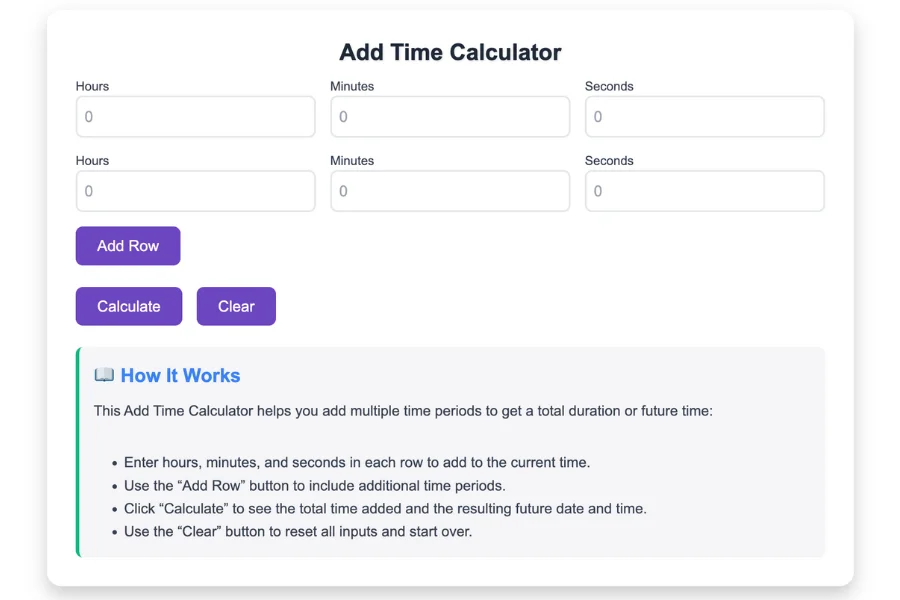
- Step 1: It is recommended that you check the Display Settings first in order to determine what options you have. Hours, minutes, seconds, and milliseconds can all be included or excluded.
- Step 2: Next, you’ll enter your time entries. Each row has a column indicating Hours, Minutes, Seconds, and Milliseconds. Let’s say you have one hour and twenty minutes. In the hours field, type one and in the minutes field, enter twenty.
- Step 3: Add 47 minutes to the minutes column of the second time row using the first row’s time, which is 1 hour and 20 minutes.
- Step 4: Using our example, you already have one hour and twenty minutes on the first row, and 47 minutes on the second row. Click the Calculate button to display the sum of our entries.
- Step 5: For those following along, the answer is still 2 hours, 7 minutes. To add more values, click +Add Row.
Logic for time addition
We need to know the following hours and minutes (HH:MM) in order to add up the time: 12:18, 1:45, and 8:55.
Here’s how it works. First, add all the minutes in HH:MM format and then multiply them by the converted minutes.
- Step 1: It makes sense to begin with the smaller value, minutes, since 118 is equal to 18 + 45 + 55.
- Step 2: Since you want to see how many groups of 60 there are in 118 minutes, 118 / 60 = 58 is the remainder, not the decimal value, since you just want to see how many groups of 60 there are.
- Step 3: As a result of our list, we have 12 + 1 + 8 = 21 hours. The hours derived from converted minutes would be 21 + 1 = 22 hours.
- Step 4: Using the original hours and converted minutes, we found groups of 58 within 118 total minutes, thus resulting in 22 hours and 58 minutes.
A variety of methods are available to calculate the sum of time. The Add Time Calculator uses an alternative approach. To give you an idea, convert the inputs to milliseconds. To convert back to time format, get the sum once all conversions have been completed.
You can add time in the following ways
To get an answer quickly, you can add time manually by following this guide.
We need to add 12 hours and 35 minutes to 9 hours and 14 minutes to calculate.
Let’s begin by adding the 35 minutes + 14 minutes, then move forward with 12 hours and 9 hours.
9 hours 14 minutes
+ 12 hours 35 minutes
49 minutes
Starting with the minute’s unit, let’s add 4 and 5, which equals to 9 minutes. We bring down the 9 and carry over the 0 to the hours. Then, add 1 (from 14) and 3 (from 35), which equals 4, and add the carried over 0, giving 4. Now we have 49 minutes.
Now let’s do the addition on hours: 9 + 12 equals 21 hours.
Add Time Calculators: What Are the Benefits?
The Add Time Calculator is useful for a number of reasons, regardless of your role in your professional life or day-to-day duties.
1. Making a daily schedule
A timer calculator is useful for planning your daily activities. For example, you might want to determine how much time remains until your next meeting or when to begin preparing for an event. A quick method for determining your next step is to multiply the current time by a number of minutes or hours.
2. Task and project management
The Add Time Calculator allows you to calculate deadlines, breaks, or the time remaining until completion of a task when you’re managing multiple tasks and deadlines. Keep track of your deadlines and you won’t miss them.
3. Efficiencies in the workplace
It is possible to schedule and allocate time more effectively with the Add Time Calculator for professionals who need to track their time throughout the day. You can use this tool regardless of whether you’re managing client projects or internal tasks.
4. Tracking exercise duration
This tool can be useful for fitness enthusiasts who are timing their cardio workouts or adjusting their rest intervals. Maintaining consistency with your fitness goals and staying on track with your workouts is easy with this tool.
5. Making personal scheduling easier
Whether you have personal appointments or errands to run, the Add Time Calculator helps you determine when your next task will be complete. A precise time can be calculated with this tool, allowing you to plan accordingly.