
📖 How It Works
- Enter the initial time duration to subtract from.
- Use the “Add Row” button to create entries for each time duration you want to subtract.
- The calculator supports negative results if the subtracted time is greater than the initial time.
- Click “Calculate” to see the final result.
With its self-explanatory name, this subtract time calculator allows you to subtract time conveniently in various units.
You are not alone if you find time difficult to understand. The concept of time still puzzles even the greatest philosopher. Luckily, there is an infinite amount of information available online to help you learn about time. Here you'll find instructions on how to subtract time using a subtract time calculator as well as how to add and subtract time independently.
No matter what time you'd like to calculate, whether it be working time, counting only Wednesdays in a given week, or changing time zones, we've got all types of time math calculators to keep you on track!
How to Use the Subtract Time Calculator
Subtract Time Calculator includes milliseconds if you're training to compete and want to check how fast you completed an activity compared to the last one.
Another scenario involves working 40 hours a week, but deducting either 7 minutes or 19 minutes. Since the calculator can have multiple entries, you can enter them quickly to see how many hours you worked.
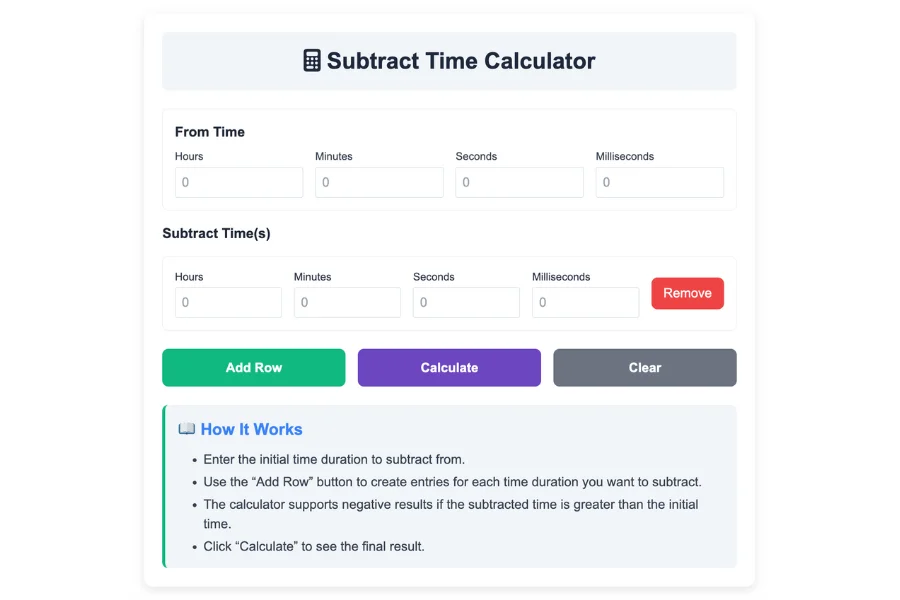
- Step 1: On the Display Settings page, you can uncheck the checkboxes for hours, minutes, seconds, and milliseconds if you don't require them.
- Step 2: The next step is to enter the base time (also called minuend). This is the time range from which you would like to subtract. For example, if you want to subtract 56 hours from your base, you would enter 56 into the first hours input field.
- Step 3: We can subtract from or add to 56 hours by entering the time we wish to subtract from or add to. For example, to subtract 2 hours, 4 minutes, and 28 seconds from the second row of the time group, just enter 2 in the hours, 4 minutes, and 28 seconds fields
- Step 4: Using the calculator, you can see your results after entering all the values. You can also add more subtractions by clicking +Add Row.
Subtract Time Calculator inputs and outputs
Calculate the mathematical difference between two (2) time inputs using this calculator. Although it appears simple, let's dig deeper into its inputs and outputs.
Display settings
You can display Hours, Minutes, Seconds, and Milliseconds on the calculator by checking the appropriate checkboxes. The default checkboxes are checked by default. Uncheck them to hide them.
Inputs
You can enter hours, minutes, seconds, and milliseconds into a calculator with two (2) rows. The first row is for entering the base time (minuend), while the second row is for subtracting it.
Outputs
Under the input fields, the results are displayed. The millisecond difference between the two computations indicates the precision of the calculator.
Addition of rows
There is no need to enter a negative or positive time multiple times. This calculator will handle it and you will get a negative or positive time depending on what you enter.
Real-life examples of subtracting time 🔄
Let's look at a few examples of how the Subtract Time Calculator works:
Example 1: Subtracting Hours for a Work Schedule 🧑💻
Suppose you have a work shift that starts at 9:00 AM, and you need to subtract 5 hours from the start time to calculate when your break is. Using the Subtract Time Calculator, you input the start time as 9:00 AM and subtract 5 hours. The result will show that your break time is at 4:00 AM.
Example 2: Subtracting Minutes for Project Planning 📋
Imagine you are working on a project that needs to be completed by 5:00 PM. If it takes you 3 hours and 30 minutes to finish a certain task, you can subtract 3 hours and 30 minutes from the final deadline to determine when to start the task. The result will be 1:30 PM, meaning you should start working on the task at this time to meet the deadline.
Example 3: Subtracting Days for Financial Analysis 📊
If you need to subtract a certain number of days from a given date, such as when calculating the number of business days between two dates, the Subtract Time Calculator can help. Let’s say the date is August 15, 2025, and you want to subtract 30 days. The result would be July 16, 2025.
Example 4: Subtracting Time for Fitness Tracking 💪
When tracking your workout progress, you might want to know how much time remains until your target goal. Suppose you have a workout program that started on July 1, 2025, and you need to know how much time remains until October 1, 2025. By subtracting the current date from the target date, you can calculate how many days or months are left until you reach your goal.
How Does a Subtract Time Calculator Work? ⏳
In many aspects of life, time management is crucial. Here are some reasons why a Subtract Time Calculator is a must-have:
- In project management, time management is crucial. The Subtract Time Calculator can help project managers ensure that all tasks are completed on time by subtracting a specific number of hours or minutes from the project's deadline. Meeting deadlines is made easier by determining when to begin a task
- It can be difficult to know when to begin preparing for an event depending on its start time, especially if you are organizing an event, meeting, or appointment. Subtract Time Calculator makes this process easyd efficient.
- The management of personal time can be challenging, especially when balancing work and family commitments. It is possible to track how much time has passed since a specific event or how much time remains on a task by using a Subtract Time Calculator. For example, subtracting your desired end time from the current time helps you plan your day better
- Time plays an important role in financial planning as well. Subtract Time Calculators can help financial analysts determine how many quarters or months have passed since an investment was made or when a specific financial event will occur for their investment portfolios
- Subtracting time can help you evaluate your progress toward a goal or milestone. The Subtract Time Calculator can provide clarity and help you remain on track, whether you are tracking the length of a workout program or estimating when your goal deadline is