
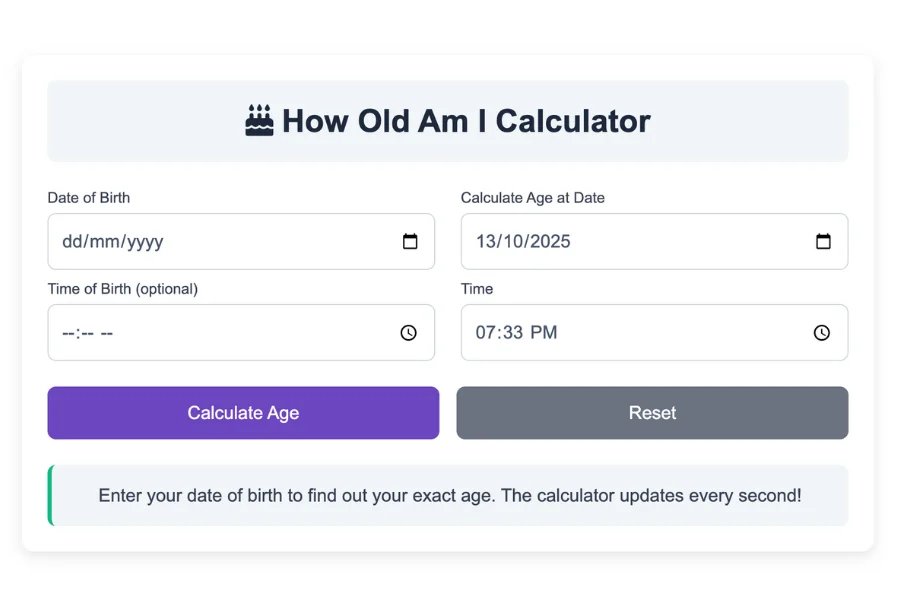
Enter your date of birth to find out your exact age. The calculator updates every second!
By entering a date of birth, you can calculate your age in years, months, and days. You can also use this calculator to calculate the time between two dates.
Besides providing results in years, months, weeks, and days, the calculator also gives results in years, months, weeks, and days.
A calculator like this can help you calculate the number of weeks and days since you were born, as well as the number of hours, minutes, and seconds since you were born.
In the most recent update to this age calculator, you can find the range of dates in which a person was born based on their age on any given day. You will then be able to input your age by scrolling down to Settings and selecting "Age.".
How to use My Age Calculator?
Step-by-Step Instructions
Step 1: Access the Calculator
- Open the "How Old Am I Calculator" on your web browser. The tool is embedded in a webpage and requires no additional software.
- The interface consists of input fields for your birth date and time, current date and time, a "Calculate Age" button, and a results section displaying years, months, days, hours, minutes, and seconds.
Step 2: Enter Your Date of Birth
- Birth Date: Click the "Date of Birth" field to select your birth date using the calendar picker. The format is typically YYYY-MM-DD (e.g., 1990-05-15 for May 15, 1990).
- Birth Time (Optional): Below the date field, enter your birth time in the format HH:MM (e.g., 08:30 for 8:30). Select "AM" or "PM" from the dropdown next to the time field. If you don’t know your exact birth time, you can leave this blank, and the calculator will assume 00:00 (midnight).
Step 3: Enter the Current Date and Time
- Current Date: By default, this field is set to today’s date (e.g., 2025-06-16 for June 16, 2025). You can change it to any other date using the calendar picker if you want to calculate your age at a specific point in time.
- Current Time (Optional): The current time is automatically set to the present time (e.g., 02:54 PM on June 16, 2025). You can adjust it by entering a different time in HH:MM format and selecting "AM" or "PM." If left blank, it defaults to 00:00.
Step 4: Calculate Your Age
- Click the "Calculate Age" button or press "Enter" while focused on any input field.
- The calculator will process the inputs and display your age in the results section, broken down into:
- Years
- Months
- Days
- Hours
- Minutes
- Seconds (updates live if the current date is today)
- If you entered an invalid date (e.g., current date before birth date), an error message will appear, prompting you to correct the inputs.
Step 5: View and Interpret Results
- The results are displayed in a grid of cards, each showing a component of your age (e.g., "Years: 35," "Months: 1," etc.).
- If you selected today’s date, the seconds field will update every second, and minutes, hours, or days may increment as time progresses.
- An explanation text below the results summarizes your age, including the exact dates and times used (e.g., "Your age from May 15, 1990 08:30 AM to June 16, 2025 02:54 PM is 35 years, 1 month, 1 day, 6 hours, 24 minutes, and 15 seconds.").
Step 6: Reset or Recalculate
- To calculate a different age, update the input fields (e.g., change the birth date or current date) and click "Calculate Age" again.
- If you change the current date to a future or past date, the live seconds feature will pause, showing a static result based on the specified date and time.
How old am I?
The chronological age calculator can be used to calculate your age by inputting your birth date and today's date. You can also input a future date to see how old you would be on that date. Each age calculation shows how many days you have left until your next birthday or event.
What is the age of my child?
When calculating the age of a newborn baby or infant, parents often need to count weeks and months. This calculator provides weeks and months automatically.
By entering your newborn's birth date in the "Find Age on" boxes and clicking the Calculate button, you can find out how many weeks old they are. In addition to showing your child's age in weeks, the calculator will also show them their age in months.
Calculation of Age
The age calculator uses two methods. The first calculates the age in years, months, and days as well as months and days. The second calculates the age in total days only to provide you with the most accurate answer.
Using the first method, the age calculator calculates age based on the number of days in all the years. There are 365 days in each year, and there are 30.4167 days in each month.
A standard-length year and month between two dates is calculated by dividing 365 by 12 to get the average number of days per month of 30.4667.
Teenagers might say they are 15 years old rather than 12 normal years plus 3 leap years.
There is no difference in length between regular and leap years in this age calculator. The same is true for months, where each month has a generic length of 30.4167 days.
Calculators use programming functions to find the exact number of days since a date of birth or event. This function counts regular years and leap years in a span of time. After converting the time span into days, the calculator calculates how old you are.
The age is calculated as the sum of the following factors:
- In the year x, 365 days are added to the year, so 365 times x plus 365 times x = 365.
- A leap year is when 366 days are added to a year, so 366 times y equals 366.
- Partially completed year's number of days
In addition to calculating the number of days in a partial year, the calculator calculates the time between your date of birth and today's date. The result includes the number of years, months, and days since your birth.
Age calculation
Calculating the difference between two ages or dates is done as follows:
- Organize the dates using the long subtraction method. Put the older date at the bottom and the newer date at the top.
- To determine the number of days you will borrow, subtract days from months. If needed, borrow 1 from the month you will be moving to.
- In the event that you need to borrow a year, add 12 months to months and subtract the months.
- The number of years should be subtracted.
- Age or date difference is expressed in years, months, and days
Calculating an individual's age is an example
In order to demonstrate how to use the calculator, let's walk through an example.
Scenario: You were born on May 15, 1990, at 8:30 AM, and you want to know your exact age as of June 16, 2025, at 2:54 PM (the current date and time).
- Enter Birth Date and Time:
- In the "Date of Birth" field, select "1990-05-15" using the calendar picker.
- In the "Birth Time" field, enter "08:30" and select "AM" from the dropdown.
- Enter Current Date and Time:
- The "Current Date" field should already show "2025-06-16" (today’s date).
- The "Current Time" field should display "14:54" (2:54 PM), and the dropdown should be set to "PM." If not, adjust these to match.
- Calculate:
- Click the "Calculate Age" button.
- The results section will update to show:
- Years: 35
- Months: 1
- Days: 1
- Hours: 6
- Minutes: 24
- Seconds: 0 (this will increment every second)
- The explanation text will read: "Your age from May 15, 1990 08:30 AM to June 16, 2025 02:54 PM is 35 years, 1 month, 1 day, 6 hours, 24 minutes, and 0 seconds."
- Observe Live Seconds:
- Since the current date is today (June 16, 2025), the seconds field will update every second (e.g., 1, 2, 3, ...). When seconds reach 60, the minutes will increment, and so on, potentially affecting hours and days if the calculation crosses a day boundary.
- Try a Different Date:
- Suppose you want to know your age on December 31, 2025, at 11:59 PM.
- Change the "Current Date" to "2025-12-31" and set "Current Time" to "23:59" with "PM."
- Click "Calculate Age" again.
- The results might show:
- Years: 35
- Months: 7
- Days: 16
- Hours: 15
- Minutes: 29
- Seconds: 0
- The explanation text will update accordingly, and the seconds will not update live since the date is not today.
What is the number of days until...?
The number of days to a date or event can be calculated manually by taking into account leap years, months with 31 days, 30 days, and 28 days.
The number of days in a month
- January - 31 days
- February - 28 days in a regular year
- February - 29 days in a leap year
- March - 31 days
- April - 30 days
- May - 31 days
- June - 30 days
- July - 31 days
- August - 31 days
- September - 30 days
- October - 31 days
- November - 30 days
- December - 31 days
When counting down to your birthday, Thanksgiving, Fourth of July, or vacation, you can count the days until an event like your birthday, Thanksgiving, or Fourth of July. If your date is less than a year away, add up the number of days between now and the event. After that, add the partial months, the remaining days in this month and the remaining days in the partial month before your target date.
Using this Age Calculator, you can determine how many days are left until an event date. Simply paste your current date into the "Date of Birth" field and your target date into the "Find Age on" field.
Input of dates
When the date is less than 10, you do not have to pad it with a leading zero. Please enter the four-digit year instead.
The calculator assumes the start date is day 0 and begins counting after one full day. For example, you will get a total age of 3 days if you enter 03/15/2022 and 3/18/2022. Day 1 is the 16th, day 2 is the 17th, and day 3 is the 18th. The 15th is not counted because it is day 0
Excel formula for calculating age from birthdate
In Excel, you can calculate the number of years since an event or date by inputting the month, day, and year in MM/DD/YYYY format. This is known as DATEDIF(A1, TODAY(), "Y"). The formula refers to A1 as the cell containing your date of birth or event.
To find out how many months have passed since the date of birth, use this formula in another cell: =DATEDIF(A1, TODAY(), "YM"). As a final step, type =DATEDIF(A1,TODAY(),"MD") to determine how many more days remain until the date of birth or event.
Using the "CONCAT" function, you can string your results together like this: =CONCAT(A2, "years, ", A3, "months, ", A4, "days").
Different cultures count age differently. This calculator is based on a common system of counting age, which adds one year each time a person celebrates a birthday. As an example, if someone has lived for three years and 11 months, they will be three when they turn four one month later. This system of counting ages is used by most Western countries.
Some cultures count years without including the current year when expressing age. For example, a person who is twenty years old is the same age as another who is twenty-one. A tradition in China has people being born at the age of one and gaining age at the Chinese New Year rather than their birthday. Two days later, even though a baby was only born two days before the Traditional Chinese New Year, he or she will be two.
It may seem confusing when the starting date of this age calculator is the end of a month. For example, we count Feb. 20 to Mar. 20 as one month. Taking both Feb. 28 and Mar. 31 as the end of the month, we equal one month and three days. Using both Feb. 28 and Mar. 31 as the end of the month equals one month and three days. Our calculations are based on the former method. Similar situations exist for other dates, such as April 30 to May 31, June 30 to July 30, etc. The confusion stems from the uneven number of days in different months.